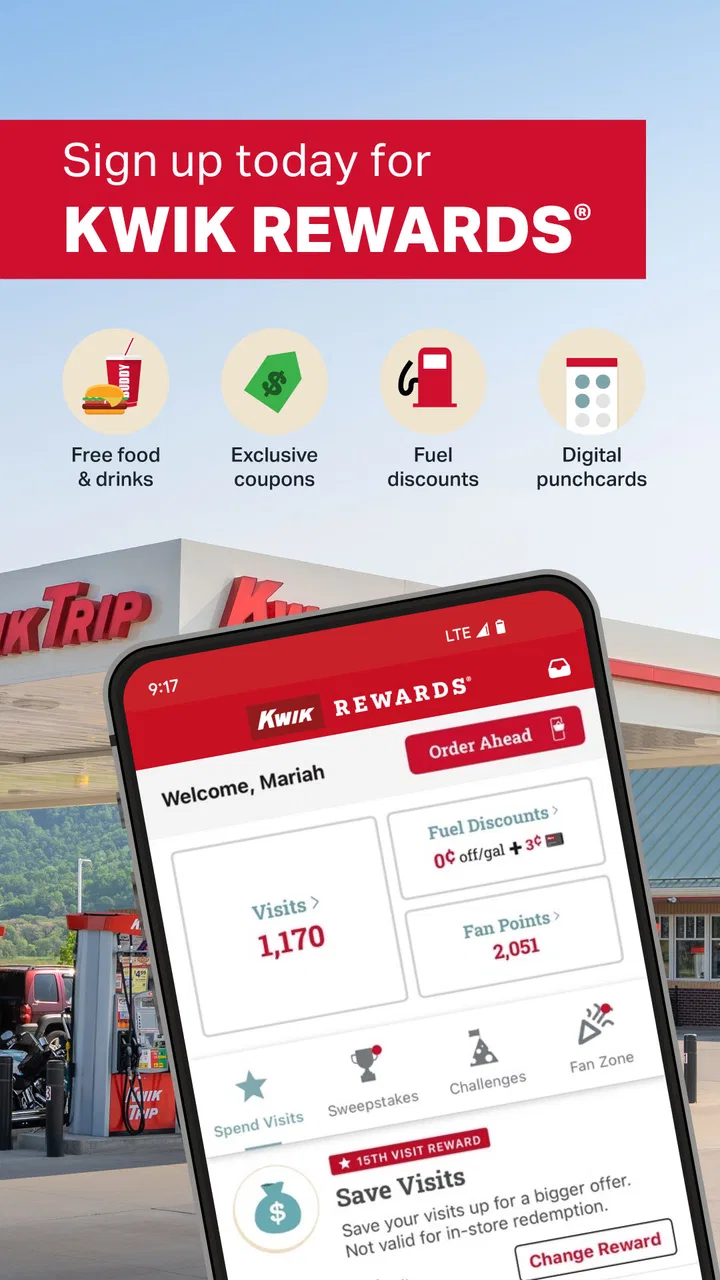
Kwik Rewards
- 4.6
- Rating
- 1.00M
- Installs
- Free
- Price
 Analysis by App-foxy
Kwik Rewards is the kind of Food & Drink app I would install for a simple reason: I visit Kwik Trip often enough that remembering a physical loyalty card feels unnecessary. It is the official loyalty app from Kwik Trip Inc, and its main purpose is to keep Kwik Rewards available on my phone instead of in my wallet. That sounds modest, but a loyalty app succeeds or fails on small moments—whether setup is clear, whether the account is ready when I reach the register, and whether recovery is painless when something goes wrong.
My overall impression is positive, especially for regular Kwik Trip customers. It is free, rated for Everyone, and has built a sizable audience, with more than a million installs and an average rating of 4.6 from roughly forty-one thousand ratings. Those figures suggest that the app is useful to many shoppers, although popularity does not remove the need to check whether it fits your routine. If you rarely visit Kwik Trip, the benefit may be too small to justify another account on your phone.
Where the experience usually gets stuck
The most frustrating part of a loyalty app is rarely the idea itself. The trouble tends to appear when a customer is standing at the checkout, trying to find the right screen, waiting for the phone to respond, or wondering whether a recent purchase was actually connected to the account. With Kwik Rewards, I would treat the app as something to prepare before shopping rather than something to explore for the first time in a busy checkout line.
You May Also Like

 Blood Strike: 2.5 Anniversary
Blood Strike’s Loadouts Turn Every Drop Into a Tactical Gamble
A close look at Blood Strike’s custom loadouts: how fast access to signature weapons reshapes its battle royale rhythm, rewards preparation, and narrows the gap between fights.

 Pandora - Music & Podcasts
Pandora’s Music Is Easy to Start, but Harder to Recover
Pandora’s strength is its low-effort path from a seed to a station. Its weak spot is how much confidence it asks you to place in connection, setup, and quiet recovery.

 8 Ball Pool
 Is Built on Rivalries, Rematches, and Routine
A close look at the rivalries, rematches, shared routines, and unanswered safety questions that turn a quick pool match into a persistent mobile community.

 Samsung Music
’s Quiet Strength Is Playing What You Already Own
Its reach comes less from spectacle than from dependable access to a personal library. That simplicity is both the app’s strongest retention engine and its ceiling.

 AccuWeather: Weather Radar
AccuWeather Review: A Quick, Clear Forecast for Everyday Decisions
For everyday plans, the best forecast is the one you can understand quickly. AccuWeather makes rain timing, radar, and local conditions easy to act on, with a few trade-offs.

 Hill Climb Racing
Why Hill Climb Racing Still Turns Crashes Into One More Run
A tiny car, a bumpy hill and one more upgrade: Hill Climb Racing keeps resurfacing because its simple chaos makes every near-miss feel personal.
More From Our News Desk



The first useful habit is opening the app before entering the store. This gives me a chance to confirm that I am signed in and that the account looks familiar. If I wait until the register, weak reception, a forgotten password, or a software update can turn a quick loyalty check into an awkward pause. The best loyalty-app workflow happens before the transaction begins.
Another common sticking point is assuming that installing the app automatically completes the important part. Installation only puts the software on the device. I still need to move through the account setup and understand how I will present or use the loyalty account during a purchase. I would not leave this until the cashier is waiting, particularly if I am using a new phone or have just reinstalled the app.
It is also worth separating three different problems: the app may fail to open, the account may not be ready, or the store connection may be unreliable. They feel similar in the moment, but the solutions are different. Restarting an app will not fix a forgotten account detail, and changing a phone setting will not necessarily resolve a temporary service issue.
I would also avoid judging the app by one rushed visit. Loyalty tools are most useful when they become part of a repeatable routine. After a few visits, the important question is not whether the interface is exciting; it is whether I can reach the needed account screen quickly and confidently. For this app, convenience comes from repetition rather than from a large collection of features.
What to check before the first purchase
After installing it, I would use a quiet moment to complete the account process, sign in, and look through the main screens. I would make sure the account information is the one I intend to use and that I understand what I need to show or select during checkout. This is especially important for households where more than one person might use the same phone or where several loyalty accounts have been created over time.
I would then close and reopen the app once, not as a technical ritual but as a practical test. If it opens normally and keeps me in the expected account, I have more confidence that the next visit will be smooth. If it asks me to start over, I would resolve that at home rather than assuming the problem will disappear at the store.
Phone readiness matters too. I keep the device charged, leave enough free storage for routine updates, and avoid beginning a system update just before shopping. The current release is version 3.54.1 and requires Android 10 or later, so anyone using an older Android phone should check compatibility before planning around it. The app is also available as a mobile loyalty tool for people who prefer carrying their account digitally, but the exact experience can depend on the phone and operating system being used.
One practical tip is to place the app somewhere easy to reach, such as the first home-screen page or a clearly named folder. That sounds trivial, yet it matters when I am carrying groceries or trying to keep a line moving. A loyalty app that is technically installed but buried among unused apps is not delivering much convenience.
I would also review the app after changing phones. A device migration can copy the application while leaving the account session in an unexpected state. Rather than assuming that a copied icon means everything transferred correctly, I would open it, verify the account, and complete a test run before relying on it for the next shopping trip.
Recovering the workflow when something goes wrong
When the app behaves strangely, I start with the least disruptive checks. I close it completely, reopen it, and confirm that the phone has a working connection. If the problem continues, I check whether the app or the phone has a pending update. I prefer these steps because they can correct temporary loading problems without immediately deleting local information or repeating the entire account setup.
If the app opens but the account is not available, I treat that as an account-access issue rather than a display issue. I would carefully use the account recovery path, paying attention to the email address or sign-in detail being entered. Small typing mistakes are easy to make on a phone, and repeatedly trying variations can make the situation more confusing. A password manager or a secure personal note can help me avoid guessing, provided I use a method I already trust.
If the app freezes during a store visit, I would first move away from the register and give myself a moment to retry. I would not repeatedly tap every button, because that can make it harder to tell whether the app is responding. If the phone connection is unstable, trying again in a place with a stronger signal may help. If the account still cannot be accessed, I would complete the purchase using whatever normal alternative is available and troubleshoot later, rather than holding up the line.
Reinstalling is a later step, not my first response. It can clear a damaged local installation, but it also means I may need to sign in again. Before removing the app, I would make sure I know the account details and can complete recovery if prompted. This is one of the most useful trade-offs to understand: reinstalling may fix an app problem, but it can expose an account problem that was hidden by an existing session.
I also would not clear app data casually. That can be more disruptive than simply closing the app, and it may remove locally stored session information. For a loyalty app, the safer order is restart, connection check, update check, account verification, and only then more invasive troubleshooting. If none of those steps helps, the appropriate next move is to use Kwik Trip’s official support route rather than relying on random instructions from an unrelated source.
When the app is not the real cause
It is easy to blame the app when a loyalty action does not appear immediately, but several parts of the process sit outside the application itself. A store device, a checkout interaction, a network interruption, or an account mismatch can all create a result that looks like an app failure. I try to identify exactly what happened: did the app fail to open, did I reach the account but fail to use it, or did the purchase finish without the expected account result?
This distinction changes what I do next. If the app never opened, I focus on the phone and software. If it opened normally but the transaction did not connect as expected, I record the approximate time and details while they are fresh and seek help through the proper Kwik Trip channel. There is little value in repeatedly reinstalling an app when the underlying issue may be at the checkout or account level.
Connectivity is another important factor. A phone can show that it is connected while a particular service is slow or unavailable. I would try a basic refresh, avoid making repeated purchases solely to test the system, and wait until I can check the account calmly. For a loyalty program, patience is better than creating duplicate actions that may be difficult to untangle.
There is also a human factor. If a cashier is unfamiliar with the exact flow I am attempting, the smoothest answer may be to pause and ask what the store normally accepts at checkout. I would not expect the app alone to replace every in-store instruction. The application is one part of the loyalty experience, not a guarantee that every device, network, and transaction will behave identically.
Privacy and device-sharing habits deserve a practical mention as well. On a shared phone, I would make sure the correct person is signed in before shopping. I would also avoid handing an unlocked phone to someone unless I am comfortable with what is visible on screen. The app is rated Everyone, but an age rating describes suitability, not how carefully an individual should manage account access on a shared device.
Who will get the most from it
This app makes the most sense for people who shop at Kwik Trip regularly and want their loyalty account close at hand. It is particularly useful for someone who dislikes carrying cards, frequently changes wallets or bags, or wants one consistent place to manage the loyalty side of routine purchases. The value grows when I visit often enough that a small amount of saved effort repeats across many trips.
A realistic example is a weekday commute. I stop at Kwik Trip for a drink and something to eat, open the app before reaching the counter, and use the prepared account flow instead of searching through a wallet. On the way home, I repeat the same process. The app does not transform the shopping trip, but it removes one small source of friction—and repeated small improvements are exactly where a loyalty app earns its place.
It can also suit families who have decided which account should receive their household activity, as long as everyone understands the arrangement. The important step is agreeing on the account before purchases begin. Otherwise, the convenience of a shared loyalty routine can be offset by confusion about which phone or account should be used.
I would be less enthusiastic for someone who visits Kwik Trip only occasionally, does not want another sign-in to maintain, or prefers a physical method whenever one is available. I would also hesitate to recommend making it central to a shopping trip if the phone is old, frequently offline, or shared with several people. In those situations, a simpler alternative may be more dependable.
How it compares with ordinary alternatives
Compared with carrying a physical loyalty card, the app is easier to keep with me if my phone is already in hand. It is also less likely to be forgotten in another wallet. The trade-off is that the phone must be charged, unlocked when needed, and ready to display the account. A card is less dependent on software and connectivity, while the app is more convenient for people who already organize daily tasks around their phone.
Compared with doing nothing, the app adds a little setup but gives regular Kwik Trip shoppers a dedicated loyalty workflow. Compared with a general shopping or payment app, its advantage is focus: I am not asking a broad-purpose tool to manage a Kwik Rewards account. Its limitation is equally clear—this is not a universal loyalty wallet for every retailer. If I want one app for many stores, a broader wallet may be a better fit, even if it is less tailored to Kwik Trip.
I also would not choose it simply because it is popular. A strong rating and a large installed base are reassuring signs, but my decision depends more on shopping frequency and phone habits. The app’s free price removes the financial risk of trying it, yet the real cost is attention: account setup, occasional sign-in recovery, and keeping the phone ready at checkout.
My practical verdict after living with the workflow
Kwik Rewards is a focused loyalty app that does its best work when I prepare it once and then use it consistently. I like that it is official, free, and aimed directly at Kwik Trip customers rather than trying to be a general-purpose shopping platform. The experience feels worthwhile for frequent visitors who want to replace a physical card with a phone-based routine.
My main reservation is not about the idea; it is about dependence on a working phone session at the exact moment I need it. That is why I recommend opening the app before entering the store, checking the account after a phone change, and keeping account recovery details available. Those habits prevent most avoidable surprises and make it easier to tell whether a problem belongs to the app, the device, or the transaction.
Kwik Trip Inc has kept the product in the Food & Drink category, and the app has been available since January 11, 2018. For Android users, the minimum requirement of Android 10 is worth checking before installation. With a current version of 3.54.1, I would keep automatic updates enabled when practical, but I would still avoid updating for the first time while standing at the register.
My recommendation is simple: install it if Kwik Trip is part of your regular routine, but treat it as a prepared loyalty tool rather than an emergency checkout solution. If you visit only rarely or strongly prefer offline, card-based simplicity, skipping it may be the more comfortable choice. For everyone in between, the free trial is low-risk, and a short setup at home will tell you quickly whether the convenience fits the way you shop.
In the end, Kwik Rewards is valuable because it makes a repeated task easier, not because it tries to do everything. Once the account is ready and the workflow becomes familiar, it can quietly remove the need to carry another card. That is a modest benefit, but for a regular Kwik Trip customer, it is a practical one.
FAQs for Kwik Rewards
01What is Kwik Rewards and how does it work?
Kwik Rewards is a loyalty program app designed to provide users with points for purchases made at participating Kwik Trip stores. Users can earn rewards by scanning their app at checkout or linking their purchases to their account. Points can be redeemed for discounts, free items, or fuel discounts, enhancing the shopping experience.
02Is Kwik Rewards free to use?
Yes, the Kwik Rewards app is completely free to download and use. There are no hidden costs or subscription fees involved. Users simply need to create an account to start earning points and accessing exclusive offers available through the app.
03Can I use Kwik Rewards at all Kwik Trip locations?
Kwik Rewards is accepted at all participating Kwik Trip and Kwik Star locations. However, it’s always a good idea to check within the app or with the specific store to ensure they participate in the rewards program, as availability may vary by location.
04What types of purchases earn Kwik Rewards points?
Purchases that earn Kwik Rewards points include fuel, in-store products, and eligible services. However, some exclusions apply, such as tobacco and alcohol. Users should review the app's terms to understand which purchases qualify for points and maximize their rewards earning potential.
05How do I redeem points for rewards in the Kwik Rewards app?
To redeem points, users can log into the Kwik Rewards app and browse available rewards. Once a reward is selected, users can apply it at checkout by scanning their app. The app provides an easy-to-navigate interface to track points and manage redemptions.
Pros
- User-friendly interface for easy navigation.
- Wide range of rewards and discounts available.
- Real-time updates on points and offers.
- Fast signup process with minimal steps.
- Efficient customer support for quick queries.
Cons
- Limited availability outside certain regions.
- Occasional app crashes reported by users.
- Requires constant internet connection.
- Some rewards have short expiry periods.
- Limited payment options within the app.

Kwik Rewards
Gallery